Customize your label in just a few steps
Select the vintage, bottle size, and total number of bottles you wish to purchase using the product quantity selector.
Check the “Customize label” option and enter the text you want to include. Next, select from the “Custom Units” drop-down menu how many bottles you want to customize within the selected units.
Please note that the same text will be applied to all personalized bottles of that product.
You don’t need to personalize every bottle in the order. You can combine personalized and non-personalized bottles in the same order. For example, if you select 6 bottles, you can personalize 3 and receive the other 3 with the original label.
Once you have entered the text and selected the custom units, click “Add to Cart” to add the product to your order.
If you would like to customize a different vintage, bottle size, or wine, you will need to repeat this process for each item, since customization is configured separately for each product.
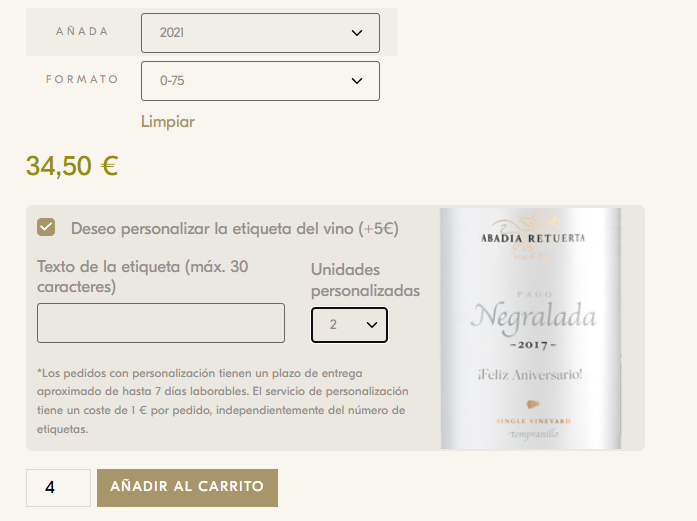
Important information: Orders with customization have an estimated delivery time of up to 7 business days. Customizing the label incurs an additional charge of €5 per label.
The customization fee (€1) will be charged for each unique label design. In other words, if a customer wants 3 bottles with the same design, the fee will be charged only once; however, if the customer wants 3 bottles with different designs, the fee will be charged 3 times.
Photos are not allowed, and the tag is limited to 30 characters.